Trades
Quote on the driveway, invoice from the van
A made-up electrician quotes an EV charger on a phone after the site visit, then invoices the finished job the following week. Every screen below is Billpad on a 390-pixel phone, and every choice in it is one we would make on a real job.
Why the estimate gets written in the driveway
Ortiz Electric (made up, like the customers below) has just looked at a garage where Priya and Tom want a Level 2 EV charger. There are two ways this usually goes. The electrician says “I’ll send you a price tonight”, and the price arrives three days later, after two other quotes. Or the price is on the customer’s phone before the van leaves.
We think the second is worth five minutes on the driveway, for three reasons: the details are fresh (panel space, cable run, where the charger goes); the customer can say yes while you are still there; and a written estimate with its assumptions spelled out is what protects you when the job turns out bigger. Here is the whole cycle on a phone, from estimate to paid invoice.
1. Start the estimate
Open the estimate generator on your phone. Everything is typed straight onto the page, with no forms to fill in first. Tap the number to edit it, or Next № to continue from your last estimate.
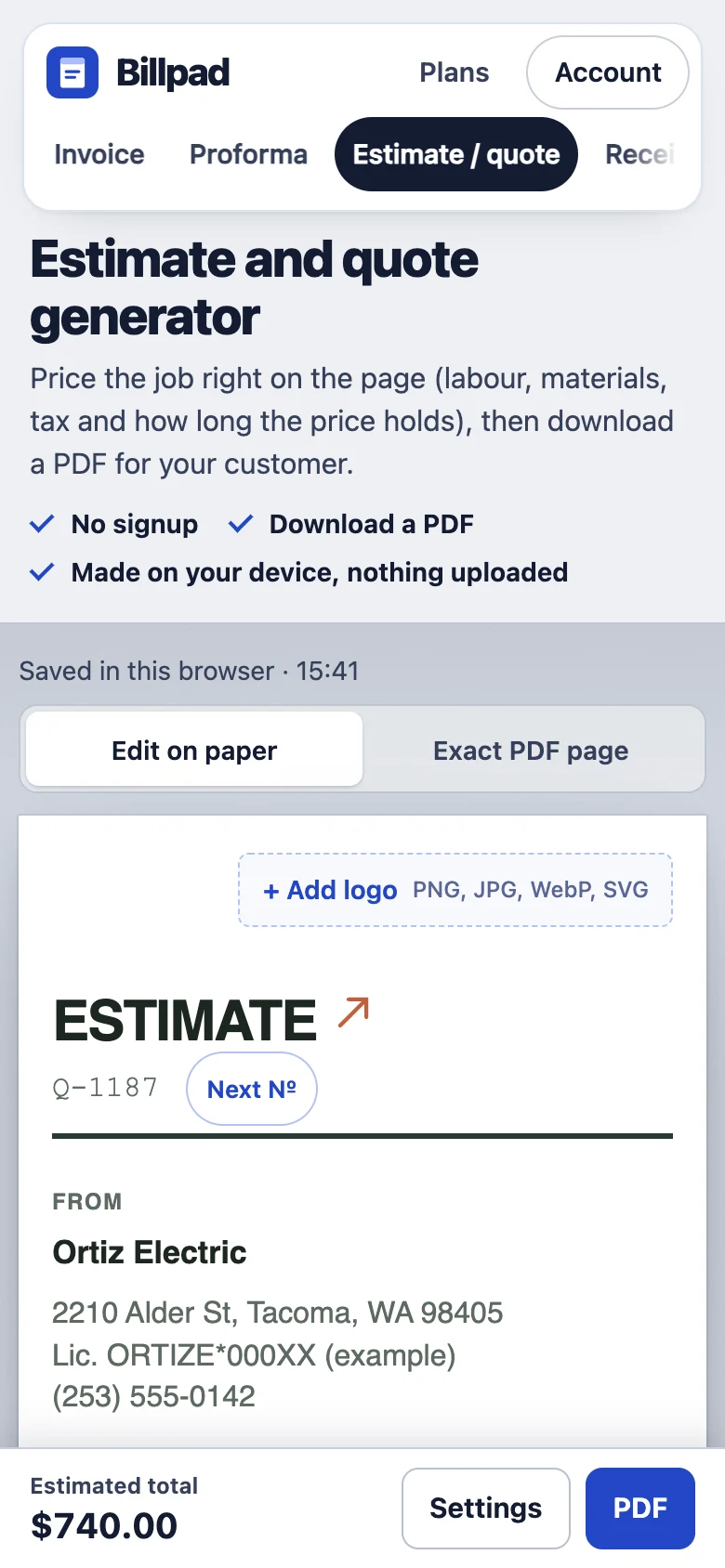
Put your licence number under your business details if your trade is licensed. Customers do check, and it costs one line.
2. Three lines, not one
The quick way to quote is one line, “EV charger installed: $740”. We would split it into three, and this is the most useful habit in this whole article:
- Labour as a fixed price. The customer is buying an installed charger, not your hours. A fixed price is easier to say yes to and keeps you from being second-guessed on time.
- Materials with what they cover: “40 A breaker, 6/2 cable and conduit, up to 15 ft”. The “up to 15 ft” is what lets you charge for the extra cable later without an argument.
- Permit and inspection at cost. It is not your money, and saying “at cost” shows it.
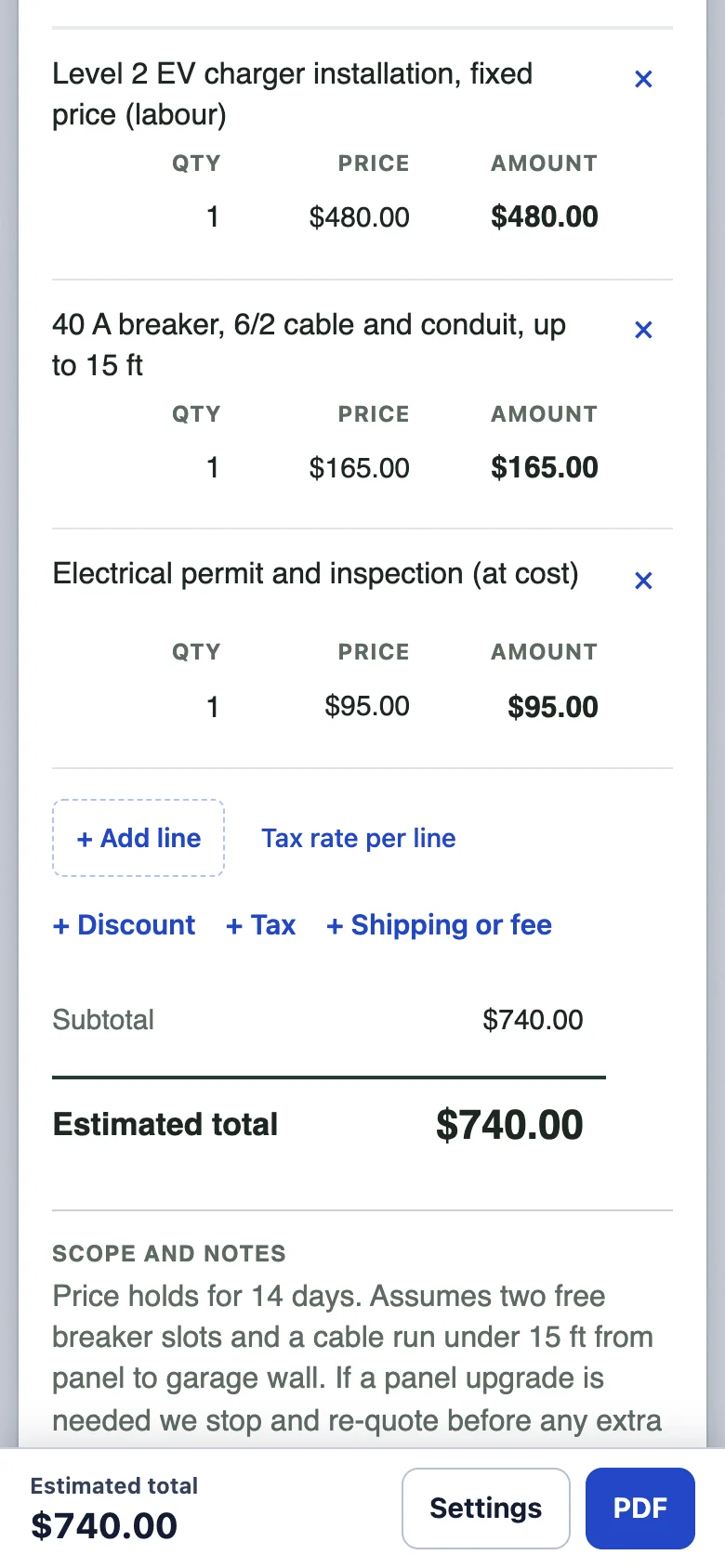
Then write the assumptions in Scope and notes, in plain words: “Assumes two free breaker slots and a cable run under 15 ft. If a panel upgrade is needed we stop and re-quote before any extra work.” That last sentence is the one you will be glad of.
3. Say how long the price holds
Open Settings from the bar at the bottom. Choose how long the estimate is valid; the date it expires appears under the total. We use 14 days for jobs with copper and breakers in them, because material prices move and a quote accepted in two months should be a new quote.
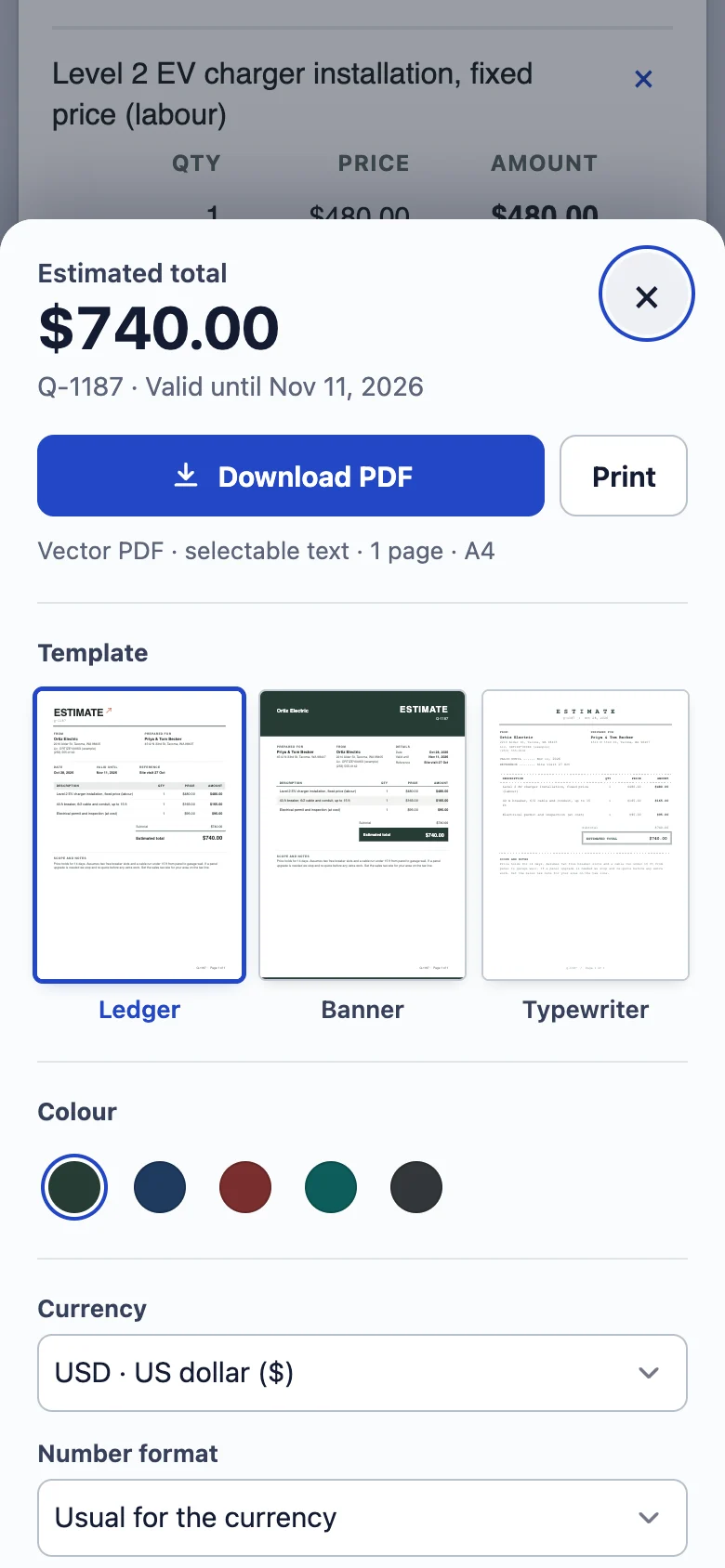
Tap Download PDF and send it from your phone by text or email while you are still there. Billpad makes the PDF on the phone itself; nothing is uploaded, and you do not need an account.
Sales tax depends on your state, and in some states on whether the job is a repair or new work. Add it with + Tax, or per line with Tax rate per line; the US section of our requirements page links each state rule we cite to the state’s own guidance.
4. A week later: the invoice from the van
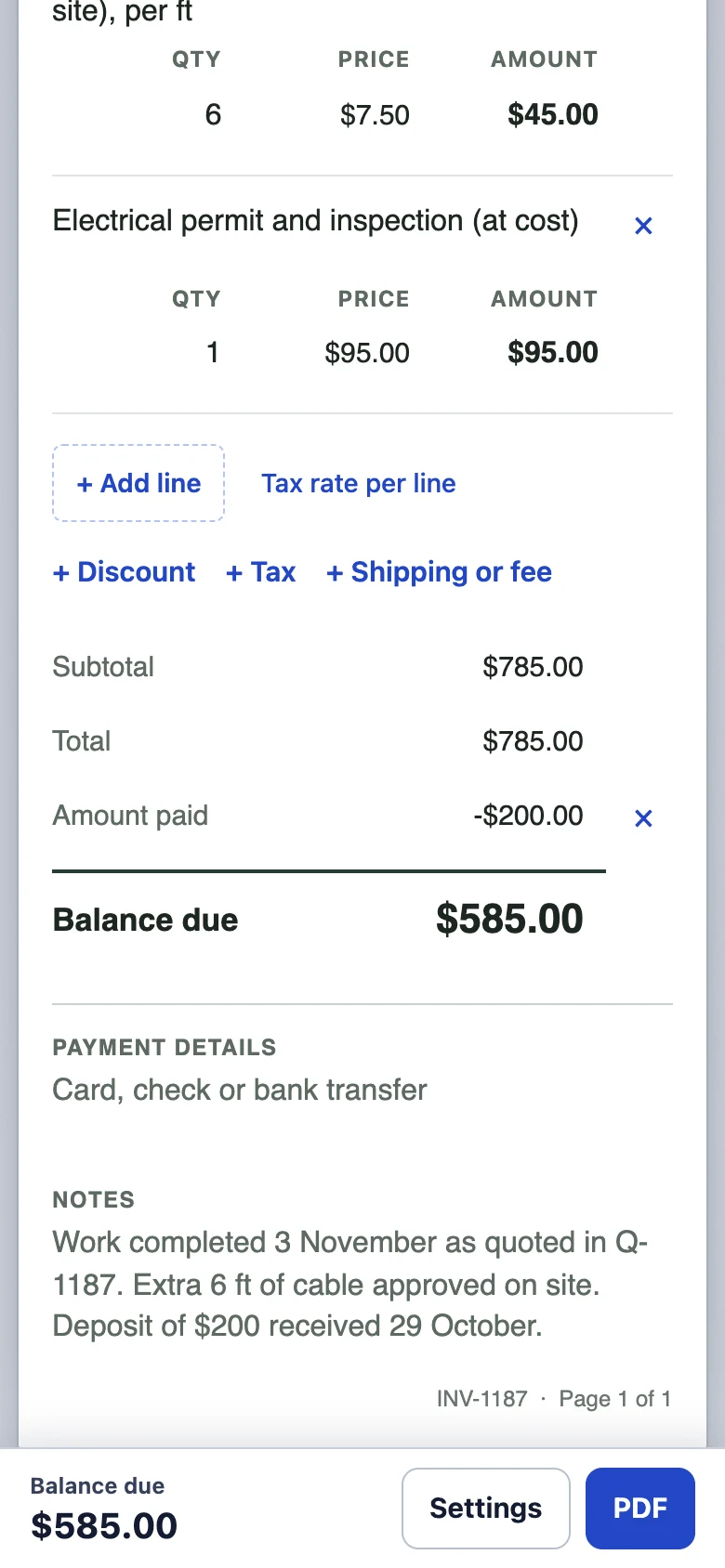
The job is done. The customer approved six extra feet of cable on the day, and paid a $200 deposit when they accepted the estimate. Open the invoice generator and build the invoice from the estimate:
- Put the estimate number in the reference field (“Quote Q-1187”). If there is ever a question, both documents point at each other.
- Copy the estimate lines, then add the extra as its own line: “Extra cable beyond 15 ft (approved on site), per ft”. A change the customer agreed to, written as a separate line, almost never gets disputed. The same change hidden in a bigger total often does.
- Tap + Payment received and enter the deposit. The invoice shows the full price, the $200 taken off, and the balance due.
One honest limitation: Billpad keeps the estimate and the invoice as separate drafts on your phone and does not yet turn one into the other with a tap. Copying three or four lines takes a minute. It also means you look at every line again before you bill it, which is not the worst habit.
5. Check the page, then send it
Switch to Exact PDF page to see the invoice exactly as the customer will. On a phone this is the step people skip, and it is the one that catches a missing line or the wrong name.
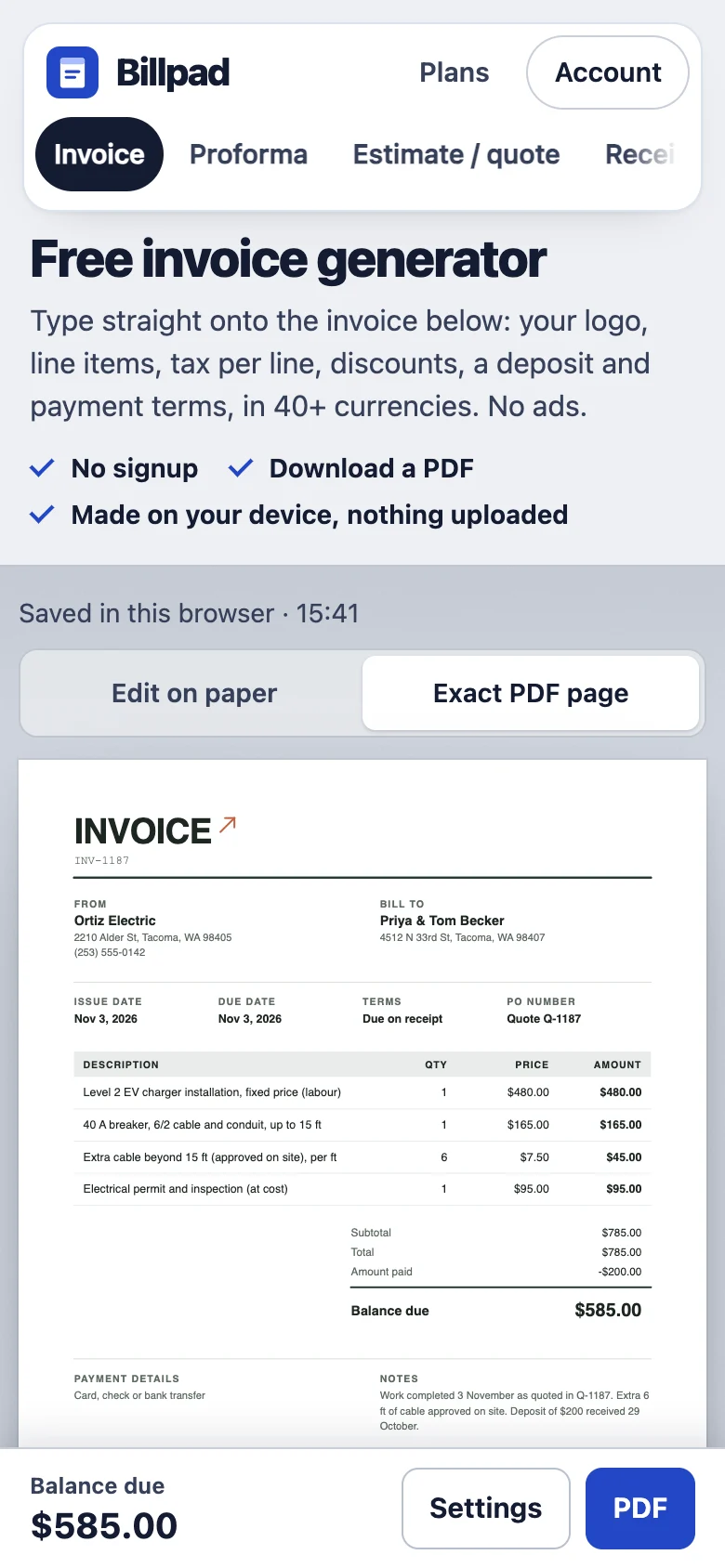
For a job paid on completion, choose Due on receipt as the terms. If you take card payments on site, send the invoice anyway: the customer needs it for their records, and you need the number in your books.
Where to go from here
Write an estimate Open the plumbing and repair invoice
For bigger jobs in stages, the contractor invoice template shows stage payments and change orders on one invoice. If you took a deposit as a separate invoice first, read how the final invoice deducts a deposit.
Updated 28 October 2026. Screenshots taken in Billpad on that day; every person, company, number and bank detail in them is made up. General information, not legal or tax advice. Spotted an error or an outdated rule? Contact us. About Billpad.