Freelancers
Invoicing a client in another country
A walkthrough with a made-up illustrator in Kraków billing a game studio in Hamburg and a publisher in Seattle: the same work, two invoices, and the five details that decide whether a foreign accounts team pays on time.
The example
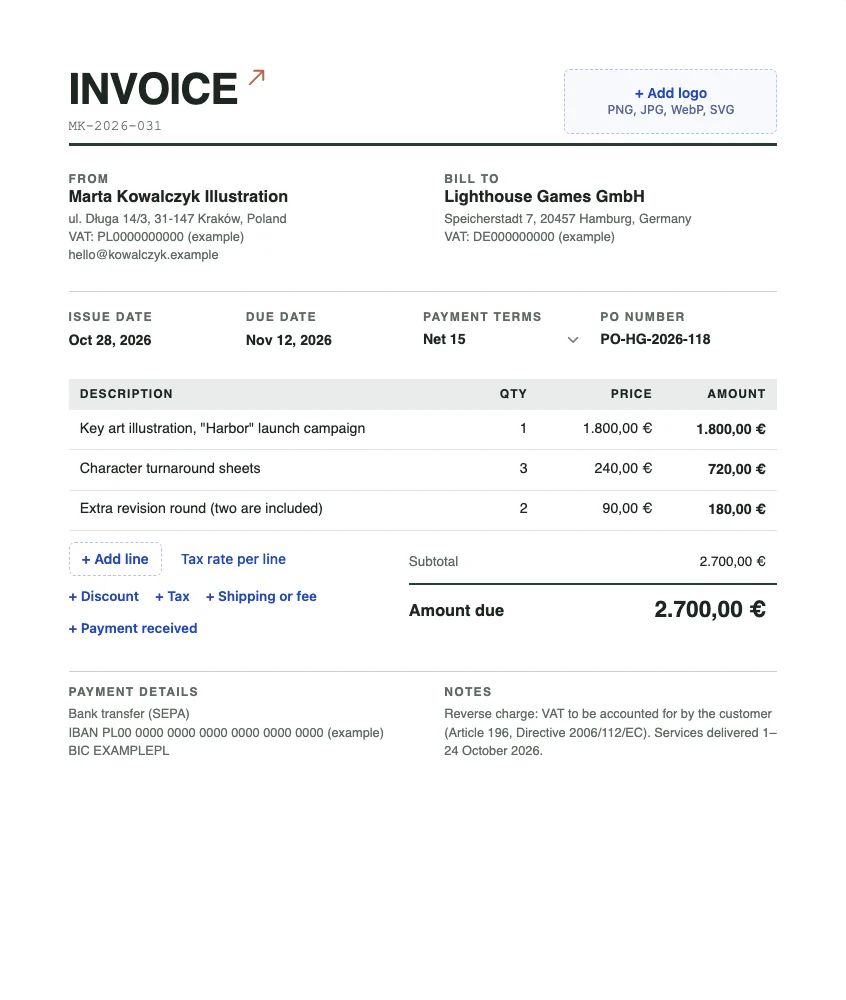
Marta is a freelance illustrator in Kraków (she, and everyone else below, is made up). In October she drew launch art for two clients: Lighthouse Games GmbH in Hamburg, who pay in euros, and its US sister company in Seattle, who pay in dollars. Same skills, same week, two invoices that need to look different. Here is the first one, made in the invoice generator:
1. Bill in the currency you want to receive, and write it so it cannot be misread
Agree the currency before the work starts and put it on the quote, then invoice in exactly that currency. Changing currency at invoice time turns a simple payment into a question for the client’s finance team, and questions are where payments stall.
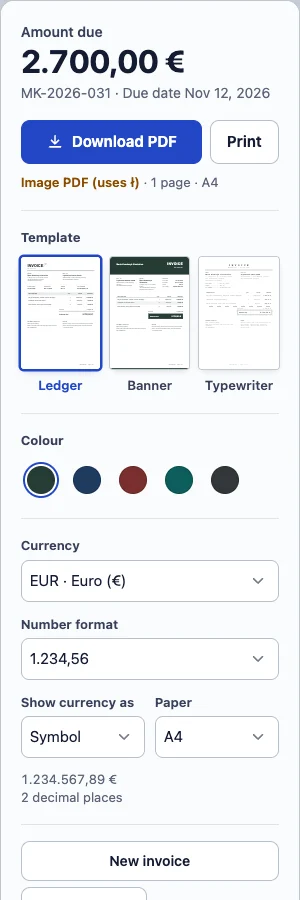
The symbol is the trap. “$” is the US, Canadian, Australian, New Zealand, Singapore and Hong Kong dollar. On an invoice to a US client, “$2,700.00” is clear. On an invoice to anyone outside the US it is not. Our rule: use the symbol only when the client is in the currency’s home country, and the ISO code (USD, CAD, AUD) everywhere else. In Billpad that is Show currency as in the settings panel:
2. Use the client’s way of writing numbers
A German accounts clerk reads “1.800” as one thousand eight hundred. An American reads it as one point eight. Most of the time context saves you, but an invoice is exactly where nobody should have to guess. Write amounts the way the person paying writes them: 1.800,00 € for Germany, USD 1,800.00 for the US.
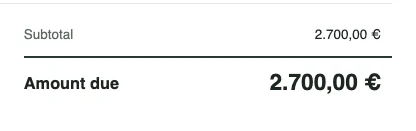
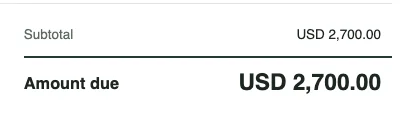
Dates have the same problem. 03/04/2026 is 3 April in Europe and 4 March in the US. Billpad writes dates with the month name (Oct 28, 2026), which nobody misreads, and we would not change that on an international invoice.
3. Business clients in another EU country: the reverse-charge line
When a VAT-registered business in one EU country sells services to a VAT-registered business in another, the customer usually accounts for the VAT, not the seller. The EU VAT Directive then expects the invoice to show both VAT numbers and the words “Reverse charge” (Council Directive 2006/112/EC (VAT Directive)). That is why Marta’s euro invoice has 0% VAT, both VAT numbers under the addresses, and a note that starts with “Reverse charge”.
Two cautions. First, this is the general EU rule for business-to-business services; goods, consumers, and some services such as events follow different rules, and your own country adds its own. Check with your tax office or adviser before your first one. Second, the US invoice has no VAT line at all, because the client is outside the EU. The comparison of invoice fields across six tax systems shows what each system asks for, and Open the EU VAT invoice template has the fields laid out.
4. Bank details that work from abroad
Inside the euro area, an IBAN and BIC are all a business needs for a SEPA transfer. From the US, the client’s bank sends an international wire, which needs the SWIFT/BIC code and your account number, and possibly an intermediary bank your own bank will tell you about. Put exactly what each client needs in Payment details, and nothing more. A wall of bank codes invites the wrong one.
One opinion we hold firmly: if you want to receive the full amount on an international wire, say so on the invoice, for example “Bank charges: paid by the sender (OUR)”. If it is not on the invoice, the default is usually that fees are shared or deducted, and you find out when 2,700 arrives as 2,676.
5. Check the PDF before you send it
Switch to Exact PDF page to see the page exactly as it will download:
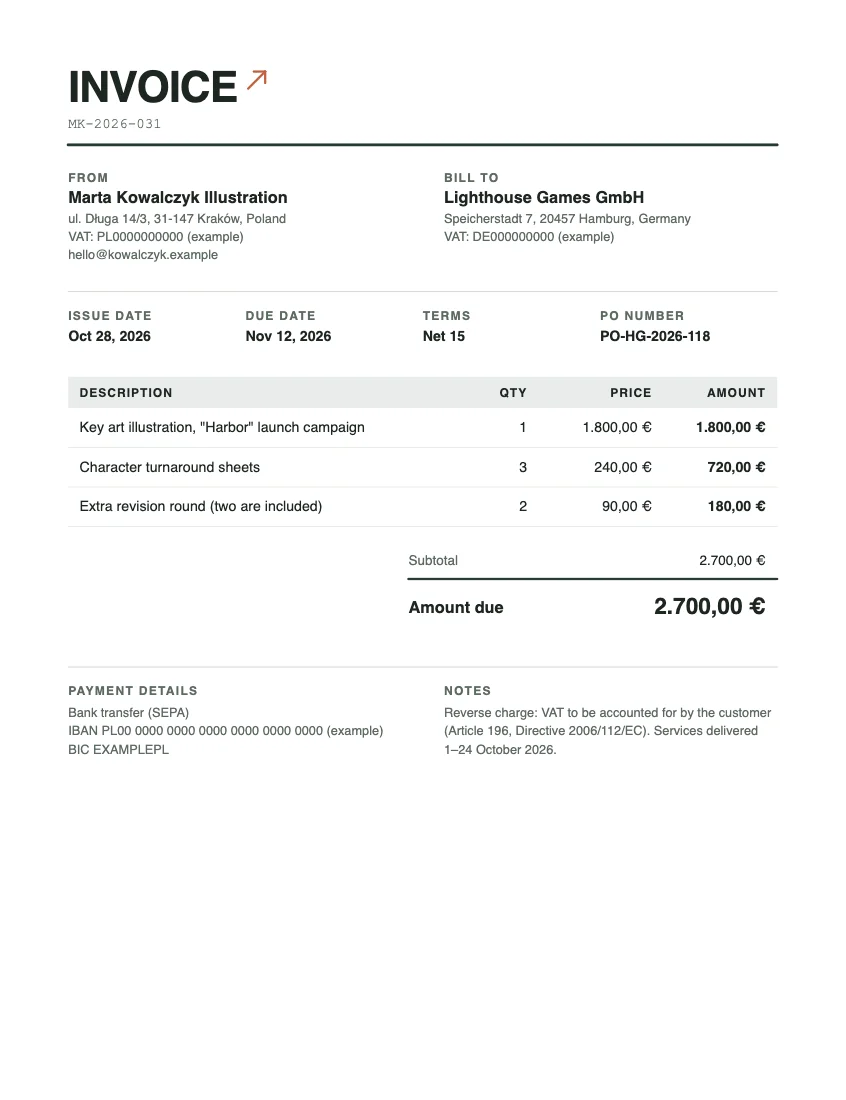
One thing we did not expect: Marta’s street, ul. Długa, has a Polish ł. The fonts built into PDF readers do not have it, so Billpad makes an image PDF instead of a text PDF and says so next to the Download button. The page looks the same, but the text cannot be selected or searched. We would keep the correct spelling: a name or address written wrongly is a bigger problem than a PDF that is not searchable. If a client’s accounts system insists on text it can read, that is the conversation to have, not a reason to misspell your street.
Before sending, also check the paper size. A4 for clients outside North America, US Letter for the US and Canada; both are in the same panel.
The short version
- Agree the currency on the quote; invoice in it.
- Symbol at home, ISO code abroad.
- The client’s number format, and month names in dates.
- EU business clients: both VAT numbers and “Reverse charge”, after checking it applies.
- The bank details that client’s bank needs, and who pays the fees.
- Look at the exact PDF page before you send.
Billing a deposit first? See deposit invoices. Not sure which due date to give a client abroad? Payment terms explained compares Net 15, Net 30 and the rest.
Updated 28 October 2026. Screenshots taken in Billpad on that day; every person, company, number and bank detail in them is made up. General information, not legal or tax advice. Spotted an error or an outdated rule? Contact us. About Billpad.